ASCII block
This block has two purposes:
- to process and display the contents of a free-text input using client-side Javascript to process text including markdown, AsciiMath and LaTeX (etc).
- to extract information from the text (as it is processed) and link that to another STACK input.
Examples of how to use this block within complete questions are given in the free-text specialist tools documentation.
The [[ascii]] castext block takes one or more optional [[filter]] child blocks and one or more optional [[extractor]] child blocks. This example links free-text input ans1 to another input ans2:
[[ascii input="ans1"]]
  [[filter type="markdown" transforms="aligneq" /]]
  [[extractor type="lastexpr" targetinput="ans2" /]]
[[/ascii]]
The student's text is run through a markdown filter first which applies normal markdown display formatting. In this example we also apply a special STACK transformation (aligneq) which aligns equations either surrounded by lone backticks or display mode LaTeX (\[..\]).
Multiple [[extractor]] blocks may be used to extract answers from the block into multiple STACK inputs. Multiple [[filter]] blocks can also be used to translate the raw original input in different ways in succession. By default, the output of one filter is fed into the next filter as the 'raw' input. Extractors are supplied with the raw input and 'map' information from the most recent filter applied. For instance, the markdown filter supplies a list of all the identified occurrences of code and AsciiMath sections in the student's text (in order) and with both the initial contents of the block given to the filter and the transformed output.
Filters and extractors are applied in the order listed in the [[ascii]] block. Filters have the option to break the chain and return to processing the initial raw student input and/or to display the output of the current filter even if there are later filters in the chain (which will thus be used for creating input for extractors, not display).
Currently, it is only possible to link one source input.
Block parameters
Functionality and styling can be customized through the use of block parameters.
input(required): string. The name of the free-text input which provides input to this block.height: string containing a positive float + a valid CSS unit (e.g."480px","100%", ...). Default is"400px". This fixes the height of the display window.width: string containing a positive float + a valid CSS unit (e.g."480px","100%", ...). Default is"100%". This fixes the width of the display window.aspect-ratio: string, containing a positive float. This can be used withheightorwidth(not both) and automatically determines the value of the unused parameter. An error will occur if values for bothwidthandheightare also set.hidden: To hide the display of the contents use the block optionhidden="true".
Filters
Filters control how the student's text input is processed and displayed. If no [[filter]] block is provided, the default markdown-math filter with transform aligneq is applied automatically by default.
A filter is specified with a [[filter]] child block inside the [[ascii]] block:
[[ascii input="ans1"]]
  [[filter type="markdown" transforms="aligneq" /]]
  [[extractor type="lastexpr" targetinput="ans2" /]]
[[/ascii]]
Note: content-less filter blocks must have a closing tag /.
Filter block parameters
type(required): the filter type. Currently available:markdown,calculation,cas.transforms(formarkdowntype): a comma-separated list of transforms to apply. Available transforms:aligneq,asciimath,boldfilter,minwrap.reset: if"true", this filter operates on the original raw input rather than the output of any preceding filter(s).display: if"true", the output of this filter is used as the final display and subsequent filters cannot modify the display.
Available filters
markdown-math filter
This is the default behaviour. If you do not specify a filter then [[filter type="markdown-math" tansforms="aligneq"/]] will be used.
The markdown-math filter processes the student's text as markdown and renders mathematical content. The following rendering rules are applied to recognized token types:
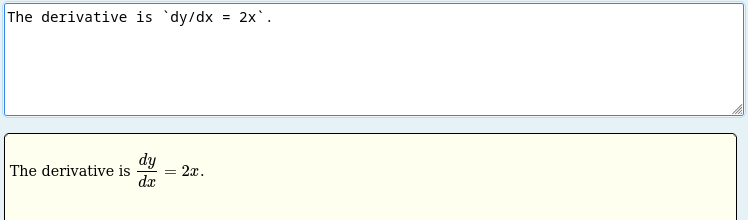
code_inline: A single backtick expression is treated as inline AsciiMath. If the content is identified as LaTeX then no processing takes place. Otherwise, the content is converted to LaTeX. The result is always wrapped in\(...\).
The derivative is `dy/dx = 2x`.
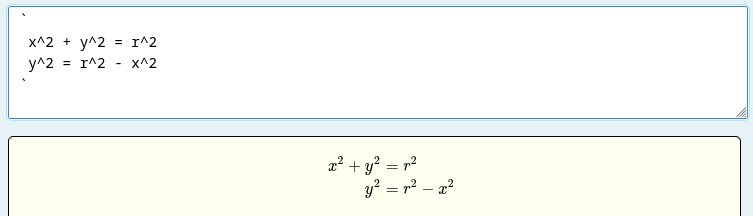
asciimath_block: A backtick on its own line opens a multi-line AsciiMath block; another solitary backtick closes it. If the content is identified as LaTeX then no processing takes place. Otherwise, each line of content is converted to LaTeX and any configured transforms are applied. The result is wrapped in\[...\]if needed.
In the following example, the transform aligneq is applied to line up equations on the = sign by using LaTeX begin{align*} environments.
  `
  x^2 + y^2 = r^2
  y^2 = r^2 - x^2
  `
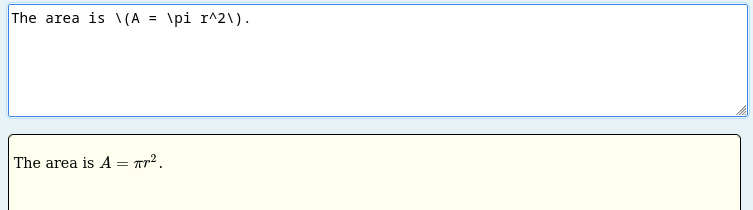
math_inline: Inline LaTeX delimited by\(...\)(identified via thetexmarkdown extension) is passed through as-is and re-wrapped in\(...\). Note,$...$is not supported for inline LaTeX to keep dollar symbols for currency.
The area is \(A = \pi r^2\).
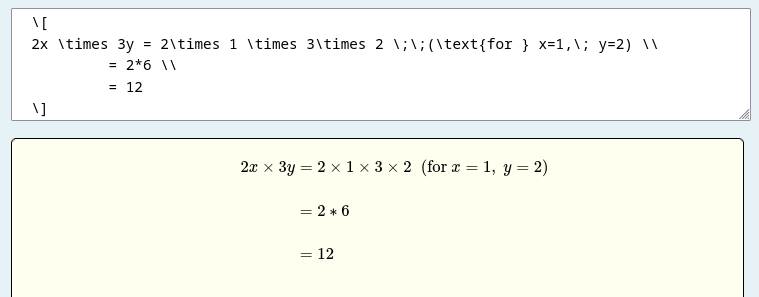
math_block: Display LaTeX delimited by\[...\]is passed through and any configured transforms are applied. Note, while our code ignores$$...$$as LaTeX delimiters, your local MathJax settings might pick this up and display the contents as mathematics. In the following example, the transformaligneqis applied to line up equations on the=sign by using LaTeXbegin{align*}environments
\[
  2x \times 3y = 2\times 1 \times 3\times 2 \;\;(\text{for } x=1,\; y=2) \\
           = 2*6 \\
           = 12
  \]
Available transforms (specified via the transforms parameter):
aligneq: This affects mathematics in theasciimath_blockandmath_block(but not inline mathematics). This is intended to automatically align mathematical derivations. In particular, it formats multiple-line mathematics aligned on the first=sign, or similar operators such as inequality. (Shown in math_block and asciimath_block examples above.) The lines of a LaTeX expression are arranged in a 3-column aligned layout:- col 1 – leading logical connective, such as implies/therefore symbol (if present, e.g.
=>,:.(therefore) in AsciiMath) - col 3 – left-hand side up to (and including) the relation symbol
- col 4 – the right-hand side
Column 2 is un-used (to right-align the lhs and left-align the rhs) of the main equation.
A \text{…} (that is not \text{or}, \text{and}, or \text{if}) is pushed into a 4th column along with anything which follows it.
There are two internal transformations: asciimath and minwrap. The asciimath transformation actually parses each expression/line from AsciiMath to LaTeX. The minwrap transformation automatically adds LaTeX mathematics delimiters, e.g. \(...\) for inline and \[...\] if they are needed (noting some LaTeX maths do not need these), typically at the end of the chain of transformations.
While you are free to specify these transformations, the markdown-math filter ensures they are used, typically at the start and end. For full control you can specify these transformations using the markdown filter below. (In the future, other transformations may need to come before asciimath, for example).
boldfilter: Changes each mathematical expression to bold. Must be applied afteraligneq(usetransforms="aligneq,boldfilter"). This is a temporary addition for testing purposes.
markdown filter
This processes the text as (plain) markdown, without the mathematical extensions above. You can add any of the transforms as arguments, but the following will treat the text as markdown, without processing any of the AsciiMath (as is done by markdown-math
[[filter type="markdown" /]]
Note that the following are equivalent
[[filter type="markdown" transforms="asciimath,minwrap" /]]
[[filter type="markdown-math" /]]
The default behaviour when no filter is present is
[[filter type="markdown" transforms="asciimath,aligneq,minwrap" /]]
This filter will be applied before any extractors you specify if you do not explicitly include a filter in your ASCII block.
Note, many of the extractor blocks require the identification of mathematics. This is done within the markdown filter. If you use another filter (e.g. calculation) no markdown filter will be added automatically - you will need to specify one yourself if required.
plain filter
If you use this filter then the text is not processed as markdown.
[[filter type="plain" /]]
This is used to switch off the default behaviour of adding markdown.
Note, many of the extractor blocks require the identification of mathematics. These include lastexpr, and lastblock, which will not function without the markdown filter of some kind being used.
calculation and cas filters
The calculation filter provides a simple scientific calculator. The filter finds text enclosed between {@...@} tags on a single line and evaluates the contents using https://mathjs.org/. For example, The answer to \(1+1={@1+1@}\). displays the answer as 2. The enclosed text is also collected as a block and available to the lastcalc extractor.
[[filter type="calculation" /]]
See the Filter: calculations documentation for full details.
Filter developer notes
Filters are defined in corsscripts/ascii/filters. This has been designed to add flexibility for filtering. Markdown transforms and associated shared functions are in corsscripts/ascii/markdownittransforms. Markdown extensions for identifying additional document sections are in corsscripts/ascii/markdownitextensions. The rules for how to display these sections are in corsscripts/ascii/filters/markdownitrules.js.